Ground control to major commenters. Ground control to major commenters. Take your funny pills, and turn your photoshop on.
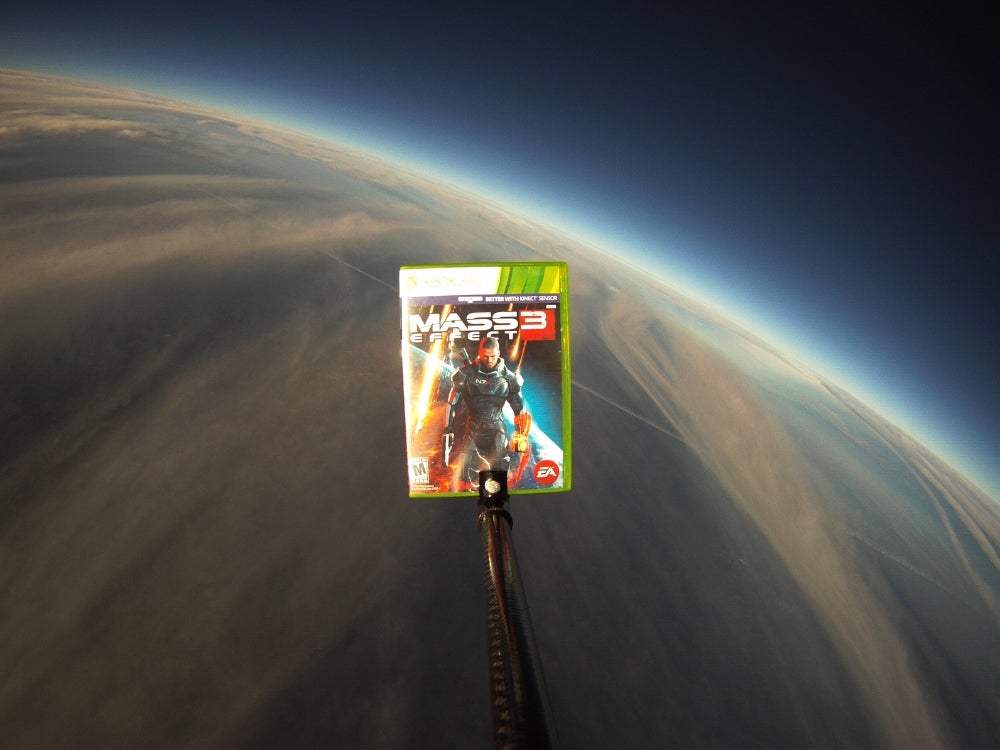
The sheer silliness of Electronic Arts’ Mass Effect 3 marketing stunt simply cannot go to waste this week, even if the base image faces, well, some challenges. For starters, there’s not much in it to look at. Also, it’s not very large. This truly is the biggest version I could find. UPDATE: Electronic Arts just sent us a hi-res version which I’ve put updated below, feel free to use that.
But if someone’s putting copies of the next big game into low-earth orbit via weather balloon, well, that’s a visual stunt we can exploit somehow, right? Consider this a mostly blank canvas upon which you may paint silliness as boundless as the heavens.
Source image: Mass Effect 3 in space, literally. I think. Well it’s way the hell up there and the sky is black.
You know the rules: The 20 best will get rounded up and published at the end of next Saturday. Meantime, I and the rest of the starred commentariat will approve and promote as many as we can so folks can see them and pass judgment.
This is your no-frills step-by-step procedure to participation in the Kotaku ‘Shop Contest.
1. Create your ‘Shop.
2. Upload it to a free image hosting service. I suggest imgur. It’s stupid simple. No account is necessary.
3. This is very important: You must use the URL of the image itself. In imgur, this is the second URL it gives you after you upload the image. It’s under “Direct Link (email & IM)”
4. At the beginning of the comments roll, click “Start a New Thread”
5. To the right of your name, select “Image.”
6. Paste the imgur URL in the image URL field. It’s the field that says “Image URL.”
7. You can add editorial commentary if you want, but then just hit submit and your image will load. If it doesn’t, paste the image URL as a comment.
8. This is important: Keep your image size under 1 MB. It will not upload to comments if it is over that size. What’s more, we’re getting reports that if your ‘Shop is more than 1000px tall (vertical), it won’t upload. If you’re getting the broken-image icon, try resizing to a smaller dimension.
Now, Gentlemen, start your ‘shopping!