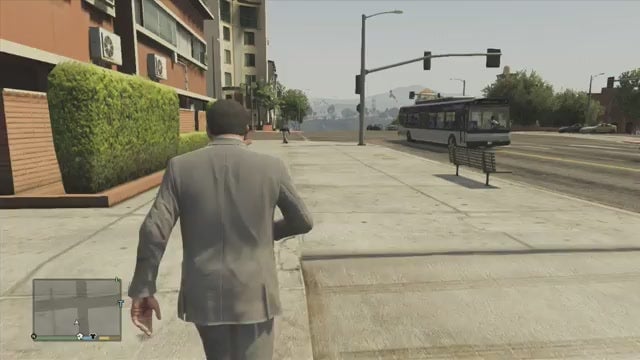
Much of the joy of Grand Theft Auto V comes from a sense of freedom, of exploring an entirely different world. The story missions are fine, the heists are neat enough, but the bustling state of San Andreas is the game’s crowning achievement. Too bad it’s far too easy to run through it and miss the best stuff.
Often, I find myself playing Grand Theft Auto games impatiently. I drive from mission to mission pell-mell, blowing through intersections to the nearest marker on the mini-map. When I get out of my car, I run to get where I’m going. I don’t linger; I hurry.
As I run around like a chicken with my head cut off (GTA V is Rockstar’s latest salvo in their ongoing war against my Xbox’s A button), the hustle and bustle of Los Santos becomes a din. The city feels heightened in that way that GTA games’ cities tend to feel, so jammed with stuff that I couldn’t possibly hope to process it all And so I don’t process it; I tune out and focus on my destination.
https://lastchance.cc/before-you-start-tips-for-playing-gta-v-1333219413%3C/a%3E%3C/p%3E
Rockstar’s world contains so, so much detail. The sound design alone… man, the sound design! I could stand still and simply listen to this game for a worryingly long time.
To better enjoy my time in Los Santos, I follow a few guidelines, each of which helps make the game more immersive. I thought I’d share them here.
1. Bring The Camera In
There are three on-foot camera settings in GTA V; you can toggle through them with the back/select button. The closest camera view, particularly when combined with the other tips here, can make the game feel substantially more intimate and immersive. With the camera closer to your chosen protagonist’s head, the game creates a convincing aural illusion; it sounds and feels less like you’re watching someone walk down the street and more like you’re actually walking down the street yourself. And kudos to Rockstar for tweaking the up-close camera to pull out a touch if you start running, which increases peripheral visibility when you need it.
2. Walk, Don’t Run
This might be the hardest tip to follow, but it’s worth trying. Every time you’re not in a car, try making yourself walk. Every GTA-playing bone in your body may be revolting, but persevere. In fact, make yourself walk long distances. Your A button will thank you!
When a cabbie drops you off a couple hundred yards from your destination, slow down and walk the rest of the way. When a waypoint is set a half-dozen blocks up the beach, consider going there on foot. Take in the sights, the sounds. You’ll hear and see things you never knew you were missing.
Just last night I went for a random stroll down the street in Los Santos:
Check out how many layers of sound there are: The underlying churn of traffic, the bursts of music from passing cars, engines, the chatter of passersby, and so on… it’s astounding that Rockstar has been able to program this much audio and have it change as often as it does.
After strolling around the city, I went out into the country:
The sounds are completely different but no less intricate. How many bird calls are in this game? It may not quite match Red Dead Redemption‘s astonishing wilderness audio in terms of sheer evocativeness, but it’s close.
Best of all, when wandering you’ll hear little conversations like this one, in which a creative-type young woman is getting turned down for a job:
That sort of small, sad detail communicates a post-aughties zeitgeist much more effectively than most of the game’s broader, clumsier satire.
3. Bike, Don’t Drive
But okay, yes, sometimes walking is just too slow. I don’t know quite how long it takes to walk around the entire state (I might try to find out!) but sometimes, you just don’t have that kind of time to spare. If you’re in a rush, of course, hop in a car or on a motorcycle. But if you’re somewhere in between, consider going for a bike ride.
You’ll forgo the game’s primary soundtrack (the excellently curated radio stations) for its secondary soundtrack (the incredible atmospheric sound design). And that’s a good thing. Take your time, cruise down to the beach or up to a hikers’ enclave in the mountains. Bikes can tackle much more intricate terrain than almost every other vehicle in the game, and allow you to explore in ways that you wouldn’t be able to on foot or in a car. And just as with real-life cycling, once you get to the top of a mountain, you get to ride back down.
4. Turn Off Aim-Assistance
This is another tip that’s better for sandbox-play than for missions, but it can make the game much more difficult and interesting. Aim-assistance often feels like Rockstar’s dirty little mechanical secret—for all their technical prowess, they can’t seem to make a free-aiming third-person shooter work all that well. Even Max Payne 3, which generally has much more precise shooting than GTA V, had to use some minor aim-assistance on consoles. A little aim-assistance is common in console shooters, but I’ve always felt like GTA‘s is a little too helpful. It’s a crutch given to players to even the odds; the controls are generally sluggish enough that without the ability to methodically snap to and pick off six enemies in a couple seconds, the game becomes much more difficult.
When taking on a story mission, I found that removing auto-aim simply made the game too hard. Things tend to escalate so quickly, and often to such ridiculous levels of violence, that auto-aim has been the only way I’ve been able to stand a fighting chance. But when messing around by myself, causing chaos in the sandbox, free-aim can be just the thing. It makes battles with the cops feel sloppy and chaotic, and makes me far more likely to make a run than to stand and fight.
5. Turn Off The HUD And Mini-Map
This isn’t my first time railing against mini-maps, nor will it be the last. I just don’t like ’em. I didn’t like the mini-map in Grand Theft Auto IV, I didn’t like the one in Far Cry 3 I don’t like how open-world mini-maps get our eyes glued to the lower corner of the screen, missing out on all the gorgeous scenery just to make sure we don’t drive past our turn. The more fleshed-out video game worlds become, the more the GTA mini-map feels like a dated, holdover solution to a problem that can now be solved more creatively.
https://lastchance.cc/youve-been-playing-gta-iv-wrong-5828760%3C/a%3E%3C/p%3E
That said, you can still experiment with mini-mapless play in GTA V and get some good results. The word “experiment” is key: You’ll want to play with turning it off at the right time, which can make the game more immersive, exciting, and unpredictable. You can also experiment with turning off the HUD, which has its own setting. That has less of an impact on the game, but can force you to rely on audio and visual cues for information rather than blinking on-screen text.
Here are your three options for the mini-map, which can be accessed in the “Display” tab on in the start menu:
Full Mini-Map: The least immersive option, but one that is unfortunately necessary for the bulk of story missions. However, if you’re just screwing around in the open world, consider trying the next two options. You can always turn it back on if you find you need it.
Blips: Rockstar’s imperfect middle ground for mini-map haters, the “blips” setting can make many of the missions more doable without necessitating the full mini-map. I found that I was able to get around okay by following waypoints without an actual road-map underneath them, and the setting did get me taking in my surroundings more when compared with the full mini-map.
That said, the “blips” setting takes some getting used to—icons resize ands shift the same as they do when the full map is showing, which makes it difficult to keep a bead on where you’re going. It can be particularly easy to get turned around if you’re out at sea in a boat or submarine. And in an odd move, Rockstar has for some reason opted to make the life-bar vanish along with the mini-map, taking that sometimes-vital information away. I found that most of the time I didn’t really need to know how my health or special ability-bars were doing, but all the same, I can’t say I understand why they decided to make it work that way. Why not make that information appear in blips mode, too?
Mini-Map Off: This is the most extreme option, but also my favorite. With the map off, you won’t be able to see all the distractions and destinations waiting for you around the map. Instead you’ll have to rely on your eyes and ears, just like you would in the real world. It’s not ideal for taking on a story mission, but if you’re just messing around in the sandbox, it’s a great way to go. For the first few minutes you play, you’ll probably feel a yearning for all the locational information you’ve grown so accustomed to. Push through it, and you’ll find a GTA V that feels substantially different than the one you’ve been playing.
When combined, these approaches should help you break out of the enjoyable but somewhat exhausting rat-race-rut that GTA V can become. Of course, each player likes playing these games a little bit differently, so I’d advise experimenting with them all to find a combination that you like Video game worlds like GTA V‘s Los Santos don’t come around that often, so it’s worth slowing down and taking it all in. Put on a nice pair of shoes, grab some guns, and go for a walk. Who knows who you’ll meet along the way?
https://lastchance.cc/the-new-best-way-to-play-far-cry-3-hud-free-and-loving-5966309%3C/a%3E%3C/p%3E
To contact the author of this post, write to [email protected] or find him on Twitter @kirkhamilton