
Do you know how much of your personal information is floating around? It’s more than you think and very easy to find. Phone numbers, home addresses, email accounts. As my recent story about gamers who got swatted showed, anybody can become a target. You don’t have to be someone with a million followers. Social networks have encouraged us share everything, including where we’re hanging out. We’ve signed up for a million different accounts, and we need to be more careful.
The worry here is doxxing.
Dox is short for documents. The act of doxxing involves finding online documentation related to a person, typically their phone number and home address. This information can be used in a variety of ways and it’s often malicious. It could exist online as a scare tactic, a way of silencing someone through fear, or it could lead to other forms of harassment, such as swatting.
Before we move forward, a warning. Some of the websites listed here could be used inappropriately. These website have been and will be used to target and dox individuals. That said, doxxing instructions are easy to find on the Internet—they’re a Google search away. Rather than pretend these websites don’t exist, it seems better to become aware of how your own information might be used against you and begin to take some precautionary measures.
Determine What Information’s Already Out There
The first step is learning how much of your information might already be floating around. It’s shocking how much I found about myself through websites designed for culling public data. What follows represents a sample of what I’ve seen referenced in various doxxing threads.
It’s important to remove information from these websites because there’s a domino effect. These websites pull details from one another. Removal from one can directly impact another.
However, this post does not cover everything. Nothing can, really. There will always be new, unexpected tools. A more exhaustive list was featured in a reddit post a few years back
Spokeo: One of the most common places for people to start looking for details. Just type in your name, email address, or phone number, and marvel at what comes back. It’s scary. It doesn’t have to stay that way, as it’s possible to opt-out and have pages disappear.
Fill out this form to have a page removed. You can do this for yourself, loved ones, and others. There’s a daily limit, but you can head back and request more takedowns. While it doesn’t permanently scrub the information from the web, it removes one of the easiest ways for people to immediately access it. The harder it is to find, the better.
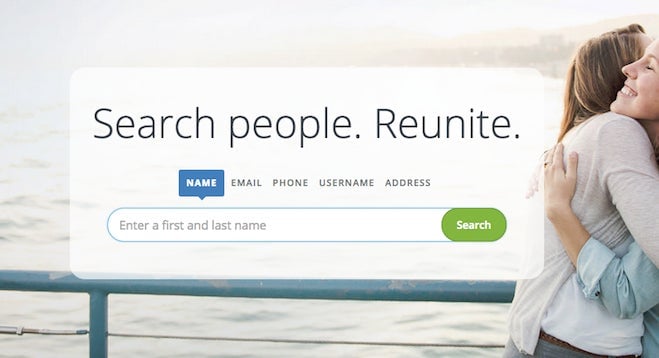 White Pages: This is one of the big aggregators. Thankfully, it’s also easy to remove everything about you, friends, and family. This page will guide you through the process.
10digits.us: Yet another aggregator culling data from across public sources.Fill out this form to have a page removed. You’ll have to send a copy of your ID, but the site allows you to blank out your ID number and other private details. It’s simply for verification.
Pipl: This one freaked me out because it elegantly compiles the information into an easy-to-read report. Listed below the report are the many sources of information Pipl is pulling from. This might help you figure out what social networking profile is responsible for listing your phone number in a public space because you didn’t adjust the privacy settings.
WHOIS: If you own a domain, information on the owner is public. You’d be surprised how many people accidentally allow their home address, phone number, and other details to be listed so freely. This is often because they’re not aware of it. Most domain providers make it possible to hide all of these details. Hover, for example, offers this service for free.
Privacy Settings Are Boring But Really Important
Our personal information is monetized by social networks, and it’s the reason these networks don’t charge anything. But when’s the last time you took a long look at your privacy settings?
Location data, which leaves a publicly available bread trail, is the primary concern here.
Log out your social network of choice and check out the “public” version of your profile. You might think your profile is private, but it doesn’t mean some of that information isn’t available.
While every network is different, there’s a few really common examples of privacy missteps.
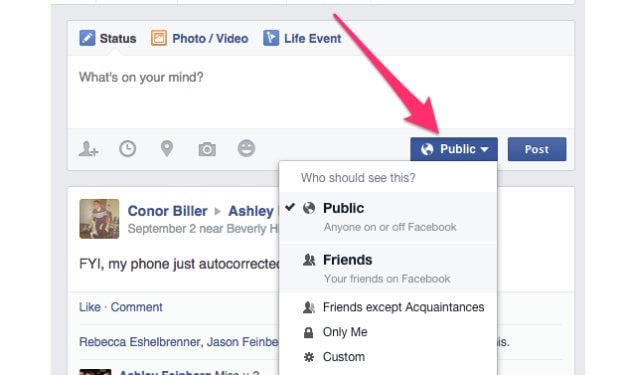
Facebook has some default settings, but they don’t really go far enough. If someone’s trying to learn about you, Facebook’s a tremendously useful place to start. Many people don’t hide their friends list, for instance. You might have our privacy settings locked down, but do your friends? For more, read this extensive piece from Gizmodo on totally locking down Facebook.
 On Instagram, profiles are public unless you specify otherwise. Even if you don’t tag locations, Instagram marks photos on a “photo map.” Maybe you’ve snapped photos of your animals, children, or friends at home. GPS data is incredibly accurate these days. If so, this photo map leads right to your home. You can, thankfully, remove the location data and keep the photos
Each services handles this differently. Bottom line, check your settings every few months.
Your Password Sucks
I’m serious. CNET published SplashData’s annual list of the worst passwords last week, and the results are horrifying. Here are the worst offenders:
123456
password
12345
12345678
qwerty
Oof
Company databases are compromised on a daily basis. Chances are your password, for one website or another, is already available online. If you’re like most people, you cycle through a few passwords, perhaps adding tiny variations on them, and apply those across the Internet.
That’s bad. If one of your passwords is undermined, it’s easy to figure out the rest.
So much of your life is on the Internet, and it’s worth investing a few dollars in protecting it.
Last Pass and 1Password are the best options available. Each has a powerful password generator, ensuring your passwords aren’t your pet’s name with numbers. Plus, there are browser extensions and mobile applications to make them ubiquitous across nearly every platform. With the press of a button, ridiculously complicated passwords are quickly entered into whatever website your on. If your password’s compromised, they’ll make you a new one.
Learn To Love Two-Factor Authentication
Even with 1Password or Last Pass, it’s possible for a password to get shared around online. While nothing is ever truly foolproof, two-factor authentication is about as safe as you can get.
It’s a simple concept. With two-factor authentication, it’s impossible to login to any website or service without providing additional confirmation from another device. As a result, even if your password is found, unless someone has direct access to your phone or tablet, you’re fine.
Bookmark this page for an updated list of websiteswith the option for two-factor.
Below is a list of likely places where Kotaku readers might want to consider the added security:
Skype
PlayStation Network does not support two-factor at this time, unfortunately.
If You’re Worried, Let The Police Know Now
Most police departments don’t know what swatting or other forms of anonymous harassment are, but it can’t hurt to let them know you’re worried about becoming a target. Give them your phone number. In the event the police are called into action, they’ll be able to contact you.
 Granted, these steps are a pain in the ass. Changing passwords sucks. Authenticating takes time. It’s too bad we can’t just live on the Internet and have everyone be cool. We don’t live in that world. It’s highly unlikely you’ll become a target but you never know. Better to be careful.
Illustration by Tara Jacoby
You can reach the author of this post at [email protected] or on Twitter at @patrickklepek













