Do you want a split keyboard that allows the hands, arms and shoulders to sit at a more natural angle while typing, or a fully-programmable gaming keyboard with extensive macro support? Kinesis, makers of the Freestyle Edge mechanical gaming keyboard, say why not both?
Kinesis has been designing and manufacturing ergonomic keyboards since 1992, a couple of years before Microsoft’s Natural Keyboard came along and put curvy boards on the map. They’re the company responsible for the Advantage line, featuring a unique contoured design that… well, just look at it.
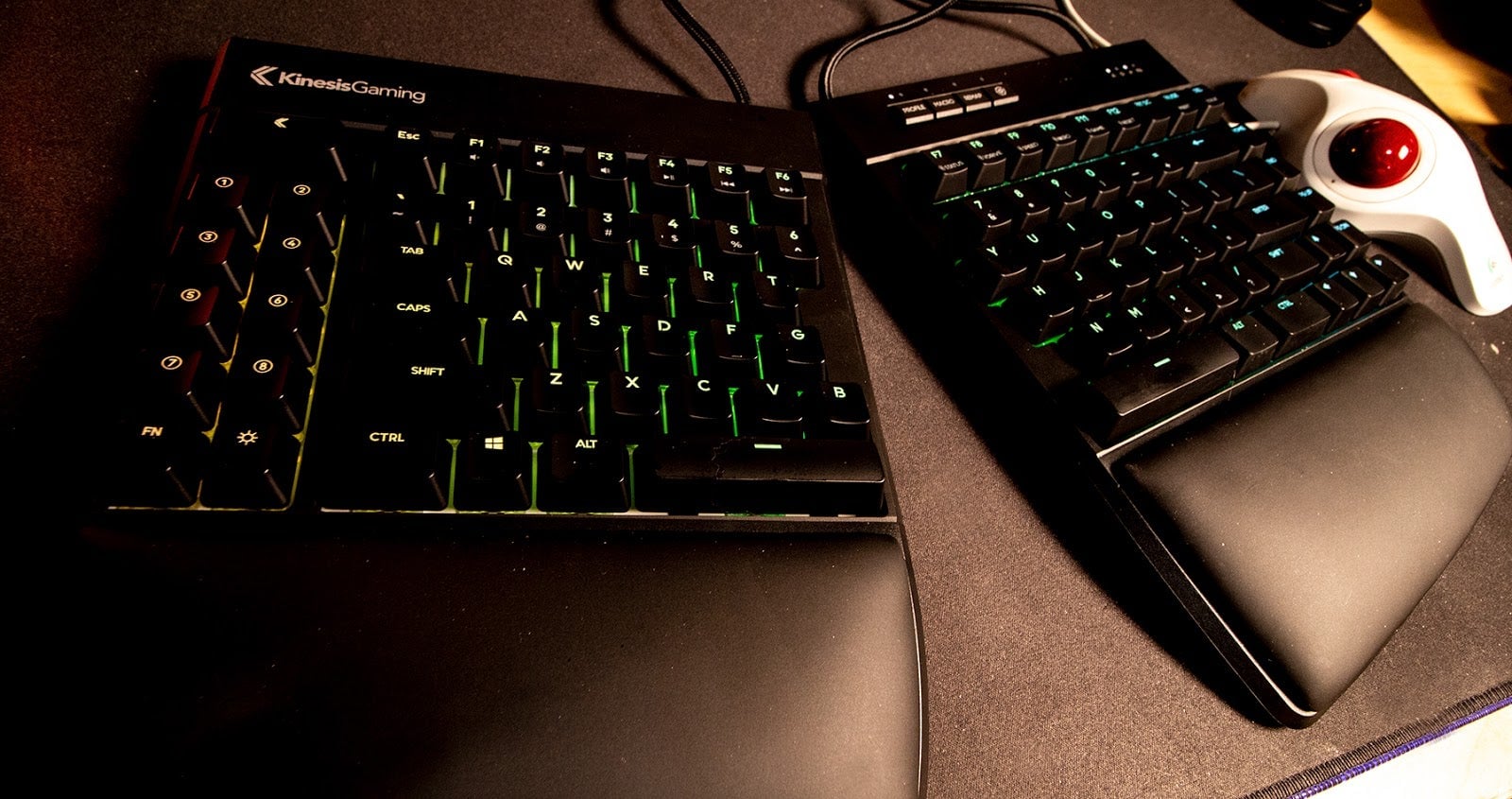
In 2007 the company introduced the Freestyle Solo, a keyboard made up of two halves joined together by a cable. The two-part construction gives users a lot of flexibility in setting up their desktop workspace. The two halves can be kept close together to mimic a standard keyboard. They can be separated to allow for differing shoulder widths or to accommodate peripherals like microphones. Depending on the user’s needs, one half of the keyboard can be pushed out of the way entirely.
But what none of Kinesis’ models have had up to this point was any sort of dedicated gaming functionality. In fact, there’s not been a lot of overlap between the ergonomic and gaming keyboard segments at all. There are several split boards out there that offer more than enough configuration options to handle gaming functions. The Ergodox EZ is certainly more than capable, but it also features a non-standard layout that takes a lot of learning.
To fill this obvious hole, Kinesis formed Kinesis Gaming and introduced the Freestyle Edge.
The Freestyle Edge shares the same basic tenkeyless design as the popular Freestyle 2, with several key differences. While the Freestyle 2is a membrane keyboard, the Edge is mechanical, utilizing either linear red, tactile brown or clicky blue Cherry MX switches. Instead of a nine inch cable separating the two halves, the Edge features an adjustable 20 inch cord, allowing for an even greater range of movement.
The two columns of function keys on the left half of the Freestyle 2 are now a bank of dedicated macro keys, one function key and a button dedicated to turning the backlight on and off. It’s a gaming keyboard so of course the keys are lit, but only in blue. There’s also a bank of four keys along the top of the right half for initiating game-specific layouts, programming macros, on-the-fly remapping and a special “SmartSet” key for accessing additional functions, toggling special modes (NKRO and Game Mode) and launching the configuration software, which is cleverly stored within the keyboard hardware itself.
It’s a split mechanical gaming keyboard, exactly as promised in the Freestyle Edge’s successful Kickstarter campaign earlier this year.
Kinesis Freestyle Edge Specs And Features
Compact tenkeyless design with standard US ANSI key layout
6’ USB cable and 20” adjustable linking cable
2 year limited warranty
Dimensions: With palm supports: 1.25” tall x 15.5” wide x 10.25” deep Without palm supports: 1.25” tall x 15.5” wide x 7.25” deep
Weight: 2.8 lbs 2.2
Premium Cherry MX mechanical switches-Red, Brown or Blue (tested)
Brilliant blue LED backlighting with 12 custom lighting modes
SmartSet Programming Engine
9 dual-layer, fully-programmable layouts
4MB onboard memory (the v-Drive)
Multimedia actions in the embedded Fn layer
Game Bank with 8 programmable game keys for binding macros and custom key actions
Available Game Mode & NKRO Mode
1000mz polling
100% anti-ghosting
MSRP: $219
Upsides
A Split Keyboard Works Damn Well For Gaming: How many times have you found yourself gaming for hours with your left hand on the WASD keys and your right on the mouse? There’s an entire half of a keyboard that rarely ever gets touched with many games. With the Edge you can push the entire right half out of the way. Any keys you might need on that side can be assigned to a key on the left side in a matter of seconds.
There are plenty of things you can do with a split keyboard that you can’t do with a one piece without voiding the warranty and possibly terminating its functions. Put a flight stick in the middle. Put a streaming mic in the middle. Keep your sandwich there. Wrap the board around a gaming laptop to get those mechanical feels. Affix both sides to the arms of your chair and pretend you’re a starship captain. Remove the detachable wrist rests and enjoy the sensation of typing on two squares.
A Relatively Standard Layout: The two split keyboards I’ve used prior to the Freestyle Edge have been the Ergodox EZ, which features a unique thumb-centric layout, and the Let’s Split, a tiny kit keyboard that only has 24 keys on each side. It took days to get used to the non-standard layouts, and weeks to get truly proficient. With the Kinesis Edge I was typing like a professional writer (sloppy with lots of typos) within minutes of hooking it up.
Aside from the wacky extra-long escape key and getting over my left hand’s need to go past the shift row over to the macro buttons, getting acclimated has been a relative breeze. Even better, having the keys fingers on the opposite hands are not supposed to stray over to several inches out of reach has improved my typing form considerably.
All The Configurability: Want to rebind a key? Hit the rebind button, the key you want to move and the key you want to move it to, and you’re done. Recording a macro on the fly is just as easy, with speeds adjustable up to 250 actions per second. The board can store up to nine completely different layouts for gaming or productivity tasks (I have a Photoshop layout programmed), with a button dedicated to swapping between them.
While most adjustments can be made directly on the board, there’s a neat little SmartSet app available for more complex programming. What’s really cool about the app is that it doesn’t install on the user’s PC. Instead, pressing a couple of keys activates the keyboard’s built-in storage as its own drive, from which users can launch the configuration tool or quickly update firmware.
The Wrist Supports: While some may find themselves removing the included wrist rests as soon as they realize they are removable, for me the smooth plastic wedges really bring the whole keyboard together. I initially thought they looked silly. Now I can’t imagine using the keyboard without them. I may even apply the soft foam sticker covers to them for a little extra comfort.
Downsides
It’s So Flat: Without the optional lift kit, which allows both sides of the board to be propped up or “tented” at several different angles, the already low-profile Freestyle Edge sits flat on the desk. There are no pop-out legs or anything of that nature. I can’t type that way. I tried, but I could never get comfortable.
The tilt kit is a pair of plastic pieces that allow the inner edges of both board halves to be elevated five, ten or fifteen degrees, which makes all the difference in the world for me. They’ll be an optional purchase when the keyboard launches wide later this year. They shouldn’t be.
Always Connected: If we’re going to suggest playing with only one half of the keyboard, why not just allow the two halves to separate completely? The adjustable 20 inch cable connecting the two halves of the Edge is good enough, with plenty of slack for sliding one side out of the way, but the option to run with just one side connected would be even better.
Customization
Replacing the keycaps on the Freestyle Edge should be easy enough, though the split space bar might cause a little trouble. Since the included keys are all the same profile (OEM home row), it’s probably best to go for something uniform, like low profile DSA. I’ve also been fiddling with thick and tall SA caps, but as much as I love them their height doesn’t work well here.
Final Thoughts
Gaming on a split keyboard isn’t new. Ergonomically-minded mechanical keyboard enthusiasts have extolling the advantages of playing games on a pair of connected keyboard halves for years. Kinesis Gaming is doing the same thing, only louder.
The Freestyle Edge is an excellent device for spreading the word. It’s well-built, easy to use, versatile and packed with handy gaming features. It’s not some garish RGB beast. It’s just a sleek little number with a cool blue glow that would like to tell the nice people about split keyboard gaming, and what it’s saying is making a lot of sense.
For more info on the edge and for updates on when they’ll be available to the general public, hit up theKinesis Gaming website