
It’s gotten easier and easier to make chiptune music (or at least, music that sounds like chiptune music), but for the most part, you’ll still need to have some sort of digital audio workstation like Logic or Pro Tools.
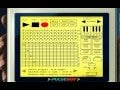
For those who want to record a simple chip melody without loading up a complicated audio program, there’s Pulseboy, a very cool, intuitive sequencer program made by Roger Hicks.
The program, which is endearingly designed to look like the screen of a GameBoy, lets you easily sequence tones, play them back, and quickly bounce them to a .WAV file. It’s a snap to use, as demonstrated by Hicks in this video:
You can easily change the waveform of the sound you’re getting—I’ve been messing around with it, and it’s really easy to make all kinds of melodies.
Hicks emailed to let us know about Pulseboy, and shared a little bit about what inspired him to create it. He says he was inspired by the online sound-effect maker BXFR and wanted to create something similar for music.
“Before releasing it to the public I found myself using pulseboy whenever I was out and about and didn’t have access to my desktop,” Hicks writes. “It allowed me to quickly record my ideas without much hassle. I’d just pull up the site anywhere and start creating music. Of course I don’t expect anyone to abandon their more advanced/professional music creation tools but this can be used to record simple ideas and introduce beginners to music composition in a tracker based form.”
While Pulseboy won’t replace Reason or Cubase anytime soon, it’s a lot of fun to play around with, and would make for a great tool for game jams, student projects, or really, anyone who just wants to mess around with cool sounds on their computer.