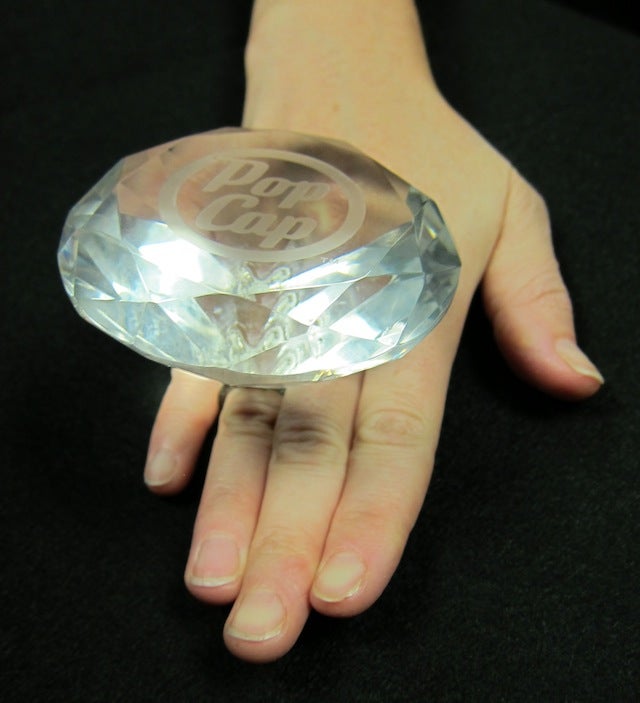
This gargantuan diamond ring PopCap gave to a Bejeweled fan for her wedding may be a fake. That doesn’t mean we can’t make it faker. ‘Shoppers, quick, to the GIMP poles!
Sotheby’s appraises this at around a 7 for exploitability, meaning it falls short of the “Shops itself” standard but still supplies a high degree of lustrous funny. Given the lack of other objects here, you’ll probably have to use your imagination, like that other ring-wielding superhero likely to see at least one entry below.
I have confidence you can find a new setting for this gem that makes both it and its wearer look radiantly ridiculous.
Source Image: PopCap’s Bejeweled Novelty Ring. (Original story, with more pictures, is here.)
You know the rules: The 20 best will get rounded up and published at the end of next Saturday. Meantime, I and the rest of the starred commentariat will approve and promote as many as we can so folks can see them and pass judgment.
This is your no-frills step-by-step procedure to participation in the Kotaku ‘Shop Contest.
1. Create your ‘Shop.
2. Upload it to a free image hosting service. I suggest imgur. It’s stupid simple. No account is necessary.
3. This is very important: You must use the URL of the image itself. In imgur, this is the second URL it gives you after you upload the image. It’s under “Direct Link (email & IM)”
4. At the beginning of the comments roll, click “Start a New Thread”
5. To the right of your name, select “Image.”
6. Paste the imgur URL in the image URL field. It’s the field that says “Image URL.”
7. You can add editorial commentary if you want, but then just hit submit and your image will load. If it doesn’t, paste the image URL as a comment.
8. This is important: Keep your image size under 1 MB. It will not upload to comments if it is over that size. What’s more, we’re getting reports that if your ‘Shop is more than 1000px tall (vertical), it won’t upload. If you’re getting the broken-image icon, try resizing to a smaller dimension.
Alright? All good? Great. Gentlemen, start your ‘shopping!
You can contact Owen Good, the author of this post, at [email protected]. You can also find him on Twitter, Facebook, and lurking around our #tips page.