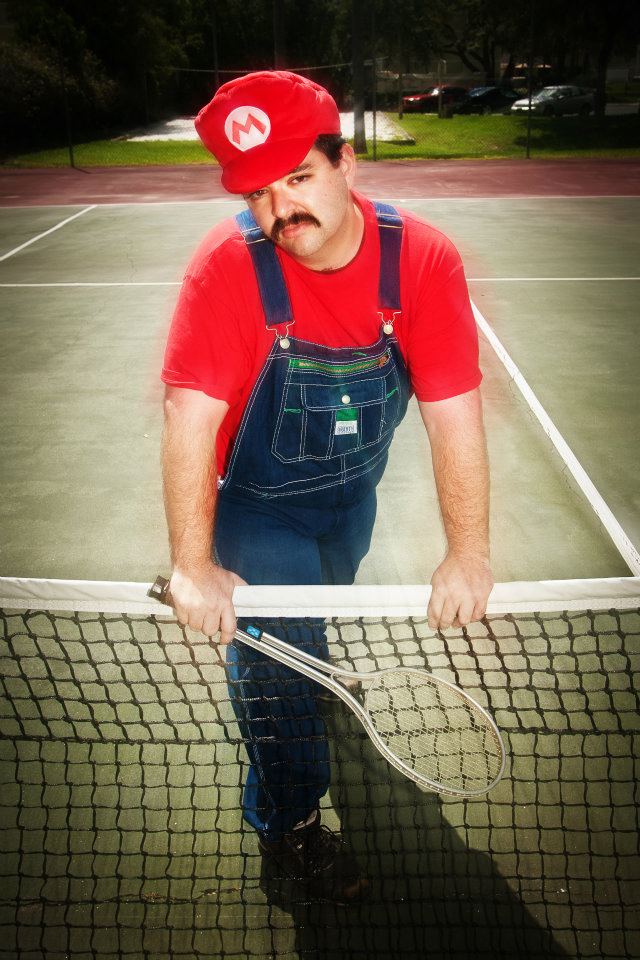
We have a special guest star in this week’s ‘Shop contest. None other than Sexy Mario has agreed to pose for you. That’s-a it, Mario, work it, baby! OK, give me more pouty …
Fresh off his latest shoot on the tennis court, Sexy Mario gave us permission to use one of his shots as the exploitable in this week’s Photoshop contest. If you want to see more of this brilliant Facebook personality, head on over to his page and give it a like. His 500th fan will be in for a very sexy surprise, and I’m sure you want to be the one who gets it.
Source Image: Sexy Mario Tennis, by Sexy Mario (used with permission)
Reminder: There’s a new forum for ‘Shop Contest submissions that will display them in the chronological order familiar to the contest under our old comments format. I’ve gone ahead and set up the forum with one of our patented Kotaku block arrows showing you where this week’s submissions begin. When I judge the entries for the roundup I’ll close it out with another arrow later in the week.
Because of this, comments are disabled in this post to avoid confusion. You must visit the ‘Shop Contest Forum to participate After you create your ‘Shop, you’ll need to post it there. Here are the rest of the guidelines for doing so.
1. Go to the ‘Shop Contest Forum
2. Click “Add Image” in the upper right above the comment window.
3. Click “Upload an Image Instead.” Then click the “Choose File” button. Browse your desktop, find the image, and click “open.”
4. If you prefer, you can upload the ‘Shop to a free image hosting service. I suggest imgur. Then click “Add image” in the upper right above the comment window. Paste the image URL into the field that says “Image URL.”
5. You can add editorial commentary if you want, but then just hit submit and your image will load. If it doesn’t, paste the image URL as a comment.
6. This is important: Keep your image size under 1 MB. Further, try to keep its longest dimension (horizontal or vertical) under 1000 pixels.
All set? Great. Now, Gentlemen, start your ‘shopping!