
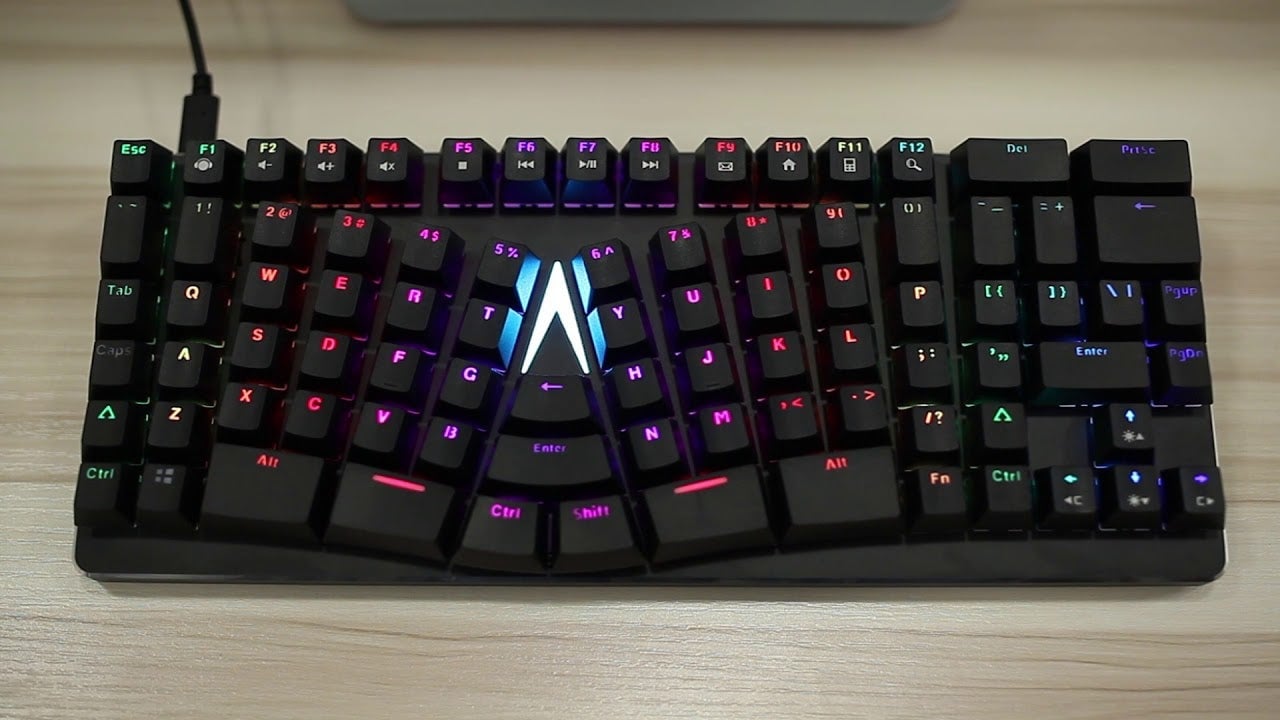
Last month Iintroduced readers to the X-Bows, a weird-looking mechanical keyboard featuring a unique cross-radial layout designed to keep the wrists straight and typing strain to a minimum. Now that I’ve gotten my hands on it, weird feels pretty good.
The X-Bows story sounds like something you’d hear in a late night/early morning infomercial. Dr. Sigo Wang, a specialist in medical imaging, kept seeing the same signs of RSI (repetitive strain injury) over and over again, stemming from long hours typing at a normal keyboard. Seeking a means of preventing these injuries in his patients, Dr. Wang began researching ergonomic keyboards. Read the next bit, directly from the X-Bows’ successful crowdfunding campaign, as popular TV pitchman Anthony Sullivan.
Over many months of determining the medical strengths and weaknesses of other ergonomic keyboards both past and present, Dr. Wang began to form his own opinion about the ideal design for a computer keyboard. The problem with ordinary keyboards was obvious to Dr. Wang – they weren’t designed to conform to the natural structure of people’s hands. The problem with the ergonomic keyboards currently on the market was simply that people were not using them.
Then this video plays.
https://www.youtube.com/watch?v=McbvFBt4IIc
As hokey as I’m making it sound, the X-Bows’ design makes a lot of sense. They’ve basically taken the two halves of the alphanumeric portion of the keyboard, bowed them inwards and staggered the keys vertically. Much like the split Ergodox layout, it looks like a pair of hands. The bowing allows for the wrists to rest at a more natural angle while typing, which in turn allows the shoulders to relax.
Wedged between the two halves are enter, CTRL, backspace and shift keys. These are meant to be hit with the thumbs, taking some of the load from the pinkie, though copies of these buttons also exist close to their standard keyboard position to help lessen the layout’s learning curve.
Aside from the strange new layout, the X-Bows is a standard mechanical keyboard. It’s got programmable keys, configurable RGB lighting and a removable USB-C cable. It features a solid mix of aluminium and plastic construction, resulting in a lightweight and sturdy typing device. It looks weird, but it types quite well.
The X-Bows will carry a suggested retail price of $200, though it is currently available via the company’s Kickstarter project for $120, with a projected fulfillment date of December of this year.
X-Bows Mechanical Keyboard Features and Specs
Unique ergonomic layout designed to reduce typing-related stress and injury
Dimensions: 345 mm x 137 mm x 30 mm
Weight: 1.76 pounds
100 percent anti-ghosting
Gateron Mechanical Keyboard Switches in linear Red, tactile Brown, heavier linear Black and clicky Blue (my production sample came with heavy-click Greens, which aren’t a standard option)
Customizable RGB lighting
Detachable USB-C cable
Key remapping (via software, not available until retail release)
MSRP: $200
Note: The X-Bows I am reviewing in this article is a production sample and may differ from the final released product. Note that I also did not have access to the unit’s programming functions.
The Upside
Comfortable: It’s amazing the difference slightly unbending one’s wrists can make. It’s the whole reason behind the X-Bows’ unique configuration, and after a week of typing in that position it’s not easy going back. It makes typing all day noticeably less stressful on the arms and shoulders.
Promotes Proper Typing: It’s much harder for fingers to stray from their proper positions on a board with the keys shaped and positioned as they are on the X-Bows. On a standard keyboard I tend to favor my left hand, its fingers often straying over into the realm of the right hand. That doesn’t work so well when there’s a wedge between the two sides. With the ASDF and JKL; keys staggered as they are on the X-Bows, keeping the fingers on or around them just makes more sense.
Unique Design: Ergonomic benefits aside, the X-Bows is a very unique-looking keyboard. The curves and key-splay cut a very distinctive figure. The aluminium top plate makes the board sturdy and free of flex, while the plastic underbelly keeps it light. And for all of those oddly-shaped keys, the X-Bows still boasts a compact form factor (slightly shorter than a standard tenkeyless board), which I like a lot.
Them Glowies: While I can take or leave RGB lighting in most instances, watching the pretty colored lights ebbing and flowing along with X-Bows’ curves makes me feel like I am typing at an amusement park.
The Downside
The Adjustment Period: While all the standard keyboard keys are present on the X-Bows, the distinctive shape and placement of those keys takes some getting used to. I typed on the board for the better part of the day before I stopped hitting the Q instead of the A and the caps lock instead of the left shift.
It took another day to get acclimated to the the CTRL, shift, backspace and return keys located in the middle of the board (my experience with the Egodox EZ certainly helped).
Weird Keycap Choices: Rather than use standard keycap shapes and sizes laid out in a special pattern, the X-Bows folks decided to go with irregular sizes to better fill out the board. The double-height 1 key, the extra-large ALT, the thicker, slightly-curved split space bar—it’s all rather funky.
Beyond size and shape, combining shine-through legends (to take advantage of the RGB lighting) with painted-on sub-legends was an odd choice. Though mine have been fine so far, I worry about those painted symbols and icons fading over time.
Customization
Yeah, good luck with that. There are far too many custom key cap shapes and sizes to be able to easily pull together an alternate look.
There, I made the escape key a waffle. Happy?
Final Thoughts
I love typing on a standard keyboard. Some of my best friends are standard keyboards. I’ve been at a typing-heavy job for nearly 11 years, and my wrists have not exploded.
That said, an ergonomic layout does have its benefits. Since I started using the X-Bows in place of my regular keyboards, I’ve experienced less shoulder strain and general arm soreness.Typing for long periods is easier and less strenuous. It’s not a night-and-day difference, but it’s definitely noticeable. It won’t change your life, but the X-Bows can make it a little more comfortable.













