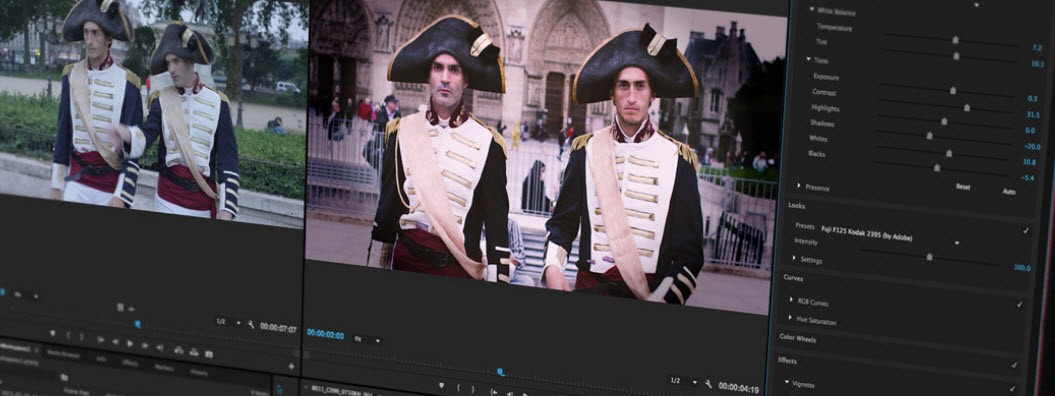
Adobe Premiere Pro is a video editing application developed by Adobe. The application is used by professionals in the film industry, so you can expect high-quality results every time. Its feature selection is very strong, with advanced features like multicam editing, as well as audio and visual controls, and visual effects. AI-powered features speed up the editing process and make working with the tool more intuitive.
The platform integrates seamlessly with other apps from Adobe Creative Cloud, such as Photoshop, After Effects, and Audition. That means you can comfortably work on a project using multiple Adobe applications without losing progress or having to go through complex downloads each time you want to transition to the next stage. Administrative tasks can be taken over by Adobe Sensei—Adobe's AI tool for task handling and automation. With Sensei, you don’t need to worry about color matching and other simple tasks.
What Are the Key Features of Adobe Premiere Pro?
Adobe Premiere Pro is a leading software for professional video editing. The software boasts non-linear editing capabilities, which means you don’t have to follow the chronology of your video during editing. In other words, you can trim and rearrange clips and work on them in any order without changing the source file.
Multi-camera editing allows users to switch between different camera angles with ease, which is especially useful for interviews and talk shows. Text-based editing is another advanced feature that separates Adobe Premiere Pro from other similar tools. With this tool, you can cut through the video by editing the transcribed text instead of manually trimming clips.
The platform also features Lumetri color tools—a set of industry-leading color grading tools for video editing. The audio editing features are not lagging either, with the Essential Sound menu offering many useful options for sound adjustment. Once you’re done with the bulk of the creative work, you can automate the simpler tasks with the help of Adobe AI (formerly known as Adobe Sensei), the built-in AI assistant that can take care of the transcribing, for example. The platform comes with a graphics library that you can use to animate text, create titles, or add effects to your videos. If you have a clear vision, you can create all of them from scratch.
All of your favorite tools will be displayed in the contextual properties panel for easier access. That can significantly speed up the video editing process.
Is Adobe Premiere Pro Free to Use?
No, Adobe Premiere Pro is not a free tool. You can test it with a 7-day free trial, but you will have to pay for a Creative Cloud subscription fee if you want to continue using the platform and all of its features afterward.
Which Platforms Support Adobe Premiere Pro?
Adobe Premiere Pro is accessible for download via Windows and macOS computers. You will need a 64-bit operating system, a modern Intel or AMD processor, and at least 8 GB of RAM (16 GB recommended).
Adobe Premiere Pro is not available on mobile devices yet, but Adobe has announced that it is working on a mobile app.
What Are the Best Alternatives to Adobe Premiere Pro?
While Adobe Premiere Pro is an industry leader, there are many other video editing software options to choose from.
Final Cut Pro is an excellent option for Mac computers only. The platform provides high-quality outputs that can rival those of Adobe Premiere Pro. In addition to that, the platform boasts high processing speeds, making the editing process much quicker. There is no subscription fee; the platform can be purchased with a one-time payment.
One of Adobe’s most popular alternatives is DaVinci Resolve. DaVinci Resolve is focused on color grading and is often considered the industry leader in this respect, above Adobe Premiere Pro. At the same time, DaVinci Resolve is a bit more difficult to use, as it doesn’t have the same layer-based editing system. The platform has a free version with limited capabilities for those who do not wish to pay for video editing software. Instead of the subscription model implemented by Adobe Premiere Pro, you can use the platform with no limitations after making a single payment. You can even download the free version to discover the features.
If you’re a beginner in video editing, you will appreciate VEGAS Pro. The program features intuitive drag-and-drop controls, making for a simplified workflow. Unlike Adobe, which places emphasis on video and final output quality, VEGAS Pro boasts advanced audio editing features. At the same time, it has fewer advanced tools in other areas of editing, making Adobe Premiere Pro the superior option for professionals.